Keystone product
KeystoneIT
In development Evaluation build in independent engineering review.
The IT service desk built for schools and multi-academy trusts.
KeystoneIT is a service desk for a Trust's IT team: a portal where staff ask for help, a workspace where the team works requests, and service targets that run on the Trust's own opening hours. It is the first Keystone product.
KeystoneIT is in development and has not been released. An evaluation build of the service desk exists and is in independent engineering review. Nobody can install or try it yet.
Independent engineering review is an internal engineering control: each stage is reviewed by someone other than its author before it is accepted. It is not an external audit or a certification.
Outcomes
What KeystoneIT is built to do.
-
Staff ask in two questions
“Something is not working” or “I need something”. Nobody raising a request is asked to choose a priority, a team or a category. That is the IT team's job, not a teacher's.
-
The team sees what is theirs
What an agent sees follows the schools their access covers and the teams they belong to. A central team and a school technician work in the same desk without seeing each other's requests by accident.
-
Targets that know when school is shut
First-response and resolution targets count time on the Trust's opening hours, skip half-term, and pause while you wait for the person who asked.
Capabilities
What is in the evaluation build.
Each capability carries the status that is true of it today. Where part of it is missing, the line marked “Not yet” says what.
For staff who need help
-
Requester portal
In the evaluation buildStaff raise a request, follow it and reply. Replying to a resolved request reopens it.
Not yet: No email is sent yet, so a reply is seen when the person next opens the portal. No attachments yet.
-
A view that is safe for requesters
In the evaluation buildA requester sees their own requests, the public replies and the status in plain words. Internal notes, priority and service targets are never sent to their browser.
For the IT team
-
Agent workspace
In the evaluation buildA queue and a request page with the whole conversation, each field saved on its own, and “reply and set status” as one action.
-
Queues and saved views
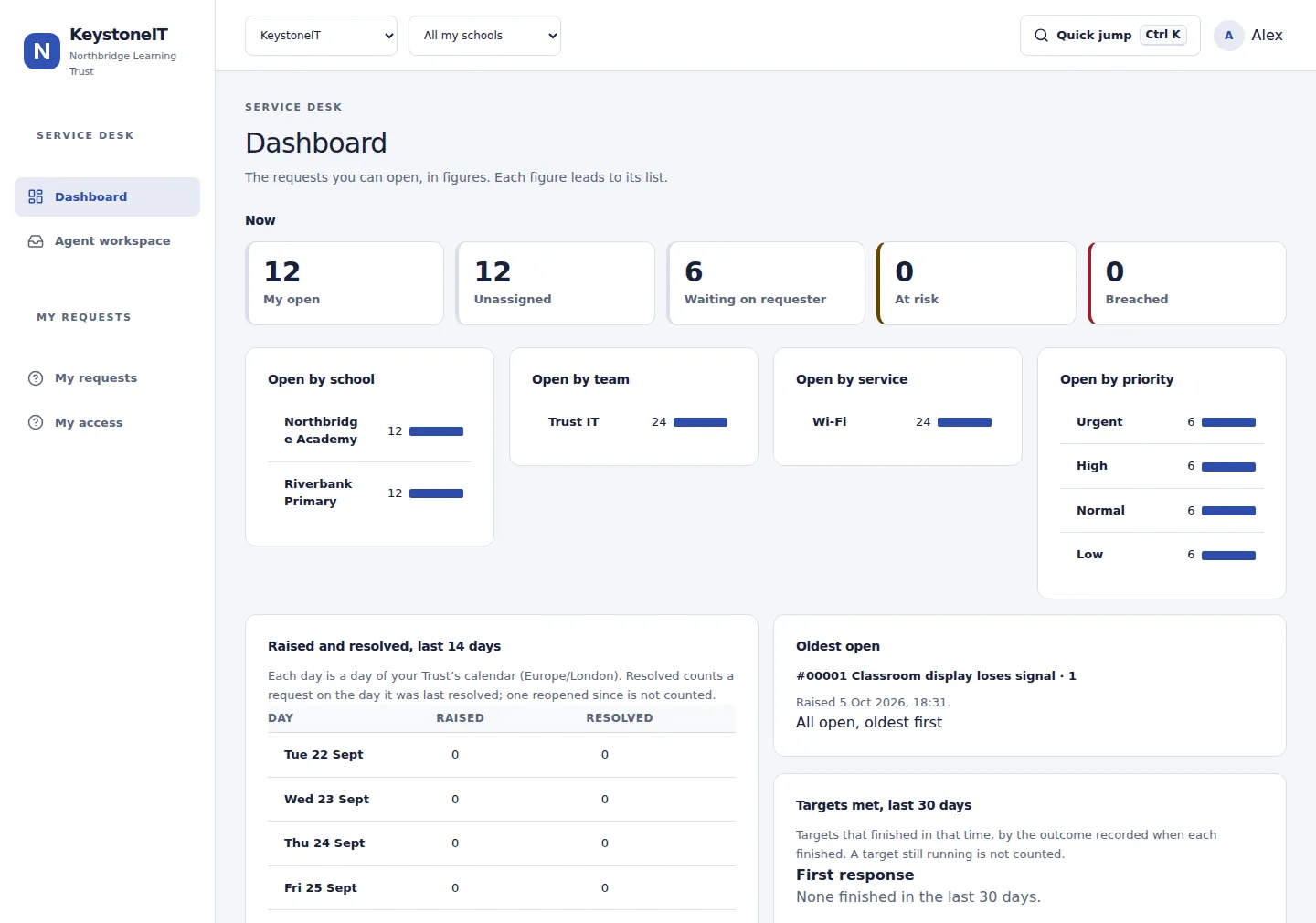
In the evaluation buildSix built-in views (My open, Unassigned, Waiting on requester, At risk, All open, Recently resolved) and your own saved views.
Not yet: Saved views are personal. They cannot be shared with a team yet.
-
Filters, sorting and columns
In the evaluation buildFilter by status, priority, assignee, team, school, service, type and target state. Five sort orders. Choose the columns each view shows.
Not yet: No bulk actions and no export yet.
-
Search
In the evaluation buildFind a request by its number, subject, the requester's name or words in the conversation. Search returns only requests you are allowed to open.
Not yet: In the agent queue only. The portal has no search yet.
-
Internal notes and public replies
In the evaluation buildTwo separate modes in one composer. The composer changes colour and says who will see what you are about to send.
-
Activity timeline
In the evaluation buildEvery change to a request (raised, routed, replied, assigned, status and priority changed, target met or missed) is an entry beside the conversation.
-
Keyboard workflow
In the evaluation buildShortcuts to search, move through the queue, assign, note, reply and send, plus a command palette. Single-key shortcuts can be turned off.
-
Dashboard
In the evaluation buildOpen requests by school, team, service and priority, raised against resolved over fourteen days, and targets met over thirty. Every figure opens the list it counts.
Not yet: The dashboard is fixed. There are no reports, exports or custom dashboards yet.
-
Safe editing
In the evaluation buildTwo people changing different fields of a request both succeed. If they change the same field, the second is told beside that field and loses nothing they typed. Unsent replies survive a reload.
Routing and service targets
-
Routing by service
In the evaluation buildA request about a named service goes to the team that supports it, and otherwise to your default team. The timeline says where it went and why.
Not yet: There are no other routing rules, no service catalogue and no approval flow yet.
-
Teams and transfer
In the evaluation buildCreate teams, add and remove members, choose the default team, and move a request to another team.
-
Service targets
In the evaluation buildFirst-response and resolution targets for each priority. They pause while you wait on the requester, resume with the time left, and show as on track, at risk, breached or met.
Not yet: Nothing alerts or escalates when a target is at risk yet. One policy for the whole Trust.
-
Opening hours
In the evaluation buildOne calendar for the Trust: opening hours by weekday, a time zone, and closures such as half-term. Target time is counted on it, across clock changes.
Not yet: A calendar for each school is not built.
Built for a Trust
-
School and Trust scoping
In the evaluation buildA request belongs to a school or to the Trust centrally. Access is granted school by school or centrally, and a school focus narrows every list and figure.
-
Access decided on the server
In the evaluation buildOne rule sits under every list, count, search and action, so a figure never includes something the person looking could not open.
-
Audit record
Partly builtEvery change writes an append-only audit record of who did what, where, and with what result.
Not yet: There is no screen to view or export the audit record yet.
-
Settings
In the evaluation buildTeams, members, services, opening hours and service targets are set up in the product.
Not yet: Statuses, priorities and request types are fixed. Managing people, roles and schools is planned and is not in the evaluation build.
-
Sign-in with Microsoft Entra ID
Under qualificationSign-in through your Trust's Microsoft Entra ID is built into the design and is the first provider planned for a pilot.
Not yet: It has not yet been proven against a live tenant.
-
Phone layout and themes
In the evaluation buildKeystoneIT works in a phone's browser, where the queue becomes cards. Light and dark themes, and a compact density for people who live in the queue.
Not yet: Tested so far in Chromium only. There is no mobile app.
-
Accessibility
Partly builtBuilt to WCAG 2.2 AA and checked automatically on every page, in both themes, at desktop and phone widths.
Not yet: A manual screen-reader test has not yet been carried out.
What is missing
Not in the evaluation build
None of these is there today. Some are planned and some are not on the plan. Nothing planned has a date.
-
Email notifications and reply by email
PlannedThe evaluation build sends and receives no email.
-
Attachments
PlannedNo file can be added to a request yet.
-
Asset management
PlannedDesigned as a likely next step. Nothing is built.
-
Managing people, roles and schools
PlannedIn the evaluation build these are set up for you.
-
Sign-in with Google Workspace or Active Directory
PlannedDesigned, not built.
-
Service catalogue and approvals
Not includedRequests can be about a named service, which decides the team. There are no request forms or approvals.
-
Reports and exports
Not includedOne fixed dashboard only.
-
Knowledge base, automation and canned replies
Not includedNot in the evaluation build.
-
Import from another helpdesk
Not includedThere is no import tooling yet.
-
Integrations
Not includedNo connection to an MIS, messaging tool or other system yet.
-
Mobile app
Not includedKeystoneIT works in a phone's browser.
-
AI features
Not includedNone.
Licensing
Priced by school. Bought once.
Keystone does not charge per technician, per requester or per ticket.
- Your perpetual licence does not expire. The licence agreement, when published, is what binds.
- One licence covers your whole organisation: a Trust, a federation or a single school, with unlimited users, agents and tickets.
- Keystone Platform comes with it. It is never a separate purchase.
| Counted schools | Perpetual licence |
|---|---|
| 1–3 | £2,995 |
| 4–7 | £4,995 |
| 8–15 | £6,995 |
| 16–30 | £9,995 |
| 31+ | Let’s talk |
Provisional. These prices and rules are provisional until the licence agreement and commercial terms are published. A quote is valid for 30 days.
KeystoneIT is in development and has not been released. A quote is for planning and budgeting. It is not an order, and we will tell you when ordering opens.
See your Trust’s price, then tell us you are interested.
Evaluations will open once the evaluation build has been accepted. Until then we take expressions of interest.